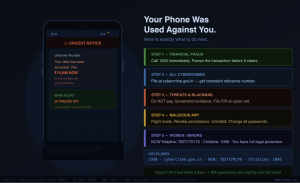
It started with a Phone message that looked completely ordinary.
A link that promised a job application form. A notification from what appeared to be a courier company asking you to update a delivery address. A QR code shared in a WhatsApp group by someone you thought you knew.
You tapped it.
Within minutes, an app installed itself. Or a screen recording started without your knowledge. Or a fake bank page collected your login details before you realised the URL was slightly wrong.
What followed may have been a demand to repay a loan you never took. A threat to send morphed or AI-generated images to everyone in your contact list. A bank alert showing a transaction you never made. A credit card charge from a city you have never visited.
You are not alone. India recorded over 1.6 million cybercrime complaints in a single year, a jump from just 208,000 five years earlier. Millions more incidents go unreported because victims do not know what to do, are too ashamed to tell anyone, or believe nothing will come of it. Dpdpa
This blog is a step-by-step guide. Every section is specific to the Indian legal and reporting system. Read it for yourself. Share it with someone who needs it. Bookmark it for the moment it becomes urgent.
If you are reading this because something has already happened to you, go directly to the action steps. Every minute matters, especially in financial fraud cases.
First, Understand What Has Happened to You
Cybercrime in India falls into a few distinct categories. The action you take depends on which one you are facing. Identify your situation before you do anything else.
Situation A: A fake or malicious app was installed on your phone
You may have downloaded an app from outside the official Google Play Store or Apple App Store, clicked a link that triggered an automatic installation, or given permissions to an app that went far beyond what you expected. Signs include: your phone slows down suddenly, battery drains faster than usual, unfamiliar apps appear, contacts receive messages you did not send, or your banking apps begin behaving strangely.
Situation B: You are being threatened with morphed, AI-generated, or intimate images
Someone is threatening to send fabricated or real intimate images of you to your contacts, family, employer, or on social media unless you pay money. This is called sextortion. The images may have been taken without your consent, created using AI from your social media photos, or captured during a video call you were deceived into having.
Situation C: Money was taken from your account without your knowledge
A UPI transaction you did not authorise. A credit card charge you did not make. Money transferred from your net banking account through a session you did not initiate. An OTP you were tricked into sharing by someone posing as a bank executive or government official.
Situation D: You received a fake loan recovery demand
A message claiming you owe money on a loan you never applied for. An app that gave you a small amount without proper documentation, collected your contacts and photos, and is now threatening your family members with messages saying you have not repaid. This is a predatory lending and extortion combination, and it is one of the most common cybercrime patterns in India right now.
Situation A: – Malicious App Installed on Your Phone
Immediate Steps
Step 1: Do not panic and do not pay anything
The moment you realise a suspicious app is on your phone, the most important thing is not to transfer any money to anyone who is asking you to. Whether the demand is framed as a loan repayment, a fine, or a fee to stop your data being shared, paying does not stop the threat. It confirms that the extortion works, and the demands will increase.
Step 2: Disconnect from the internet immediately
Put your phone on flight mode. This cuts the app’s ability to send data from your phone, access your contacts, or continue recording your screen. Do this before you do anything else.
Step 3: Document everything before removing the app
Take screenshots of the app’s icon, any messages or screens it has shown you, any demands it has made, and any transaction history it claims. Write down the name of the app exactly as it appears on your phone. This is your evidence.
Step 4: Remove the app and scan your phone
On Android: go to Settings > find the app > force stop it > clear its cache and data, and uninstall it. If you cannot uninstall it, the app may have been granted device administrator permissions. Go to Settings > search for Device Admin Apps > revoke the permission > then uninstall. After removing it, install a reputable security app such as Malwarebytes or Bitdefender and run a full scan.
On iPhone: iOS apps cannot install themselves without App Store approval. If you are seeing unusual behaviour, check whether you accepted any suspicious configuration profiles. Go to Settings, General, VPN, and Device Management, and remove any profile you do not recognise.
Step 5: Change all passwords from a clean device
Change your banking passwords, UPI PIN, email password, and social media passwords from a different device such as a laptop or another phone. Do not do this from the compromised phone until you are certain the malicious app has been fully removed.
Step 6: Notify your bank immediately
Call your bank’s 24-hour helpline and inform them that your phone may have been compromised. Ask them to place a temporary hold on any new payees, set enhanced transaction alerts, and flag your account for monitoring. Do this even if no unauthorised transaction has occurred yet.
Situation B: Threats With Morphed or AI-Generated Images
This is one of the most distressing forms of cybercrime because it targets dignity and social relationships, not just money. The most important thing to understand before you do anything else is this: you have committed no crime. The person threatening you has.
Immediate Steps
Step 1: Do not pay. Not a single rupee.
CERT-In Advisory CIAD-2024-0060 specifically confirms that paying a sextortion demand never ends the demands. Paying establishes that you respond to threats. The amount demanded will increase. New threats will follow. Every case of sextortion that resolved well in India involved victims who refused to pay and reported immediately.
Step 2: Do not delete the messages or block the person yet
Your instinct will be to delete everything and block the account threatening you. Do not do this yet. The messages are evidence. Take screenshots of every threat, every demand, every account or phone number used to contact you. Capture the account handle, URL, or profile link of the person threatening you. Save these to cloud storage or email them to yourself.
Step 3: Report to cybercrime online and call 1930
Call the National Cybercrime Helpline at 1930 or file a report at cybercrime.gov.in immediately. When filing the online complaint, choose “Women and Child Related Cybercrimes” if the victim is a woman or a minor. This category can be filed anonymously. For others, choose “Other Cyber Crimes” and select “Cyber Blackmailing / Threatening.”
Step 4: File an FIR at your nearest police station or cyber cell
Under Sections 67, 67A, and 67B of the IT Act, sharing morphed or fabricated intimate content is a criminal offence. Under the Bharatiya Nyaya Sanhita 2023, sections covering criminal intimidation, voyeurism, stalking, and obscenity apply. Take your complaint reference number from the online portal and visit your nearest police station or dedicated cybercrime cell. Every state now has a dedicated cyber cell. Bitdefender
If the local police hesitate to register your complaint, remind them that Section 154 of the CrPC mandates FIR registration for cognizable offences. Cybercrime has no jurisdiction limit — you can report from anywhere in India, regardless of where the crime originated. Dpdpa
Step 5: Request platform takedown immediately
If the threatening content has already been posted on Instagram, Facebook, YouTube, or any other platform, use the platform’s built-in report function to flag it for removal. Under IT Rules 2021, platforms are required to acknowledge removal requests and act on them. For intimate or sexually explicit content, most major platforms have expedited removal processes.
Step 6: Contact NCW if you are a woman
The National Commission for Women operates a helpline at +91 7827170170 and accepts cybercrime complaints involving women. NCW can intervene directly with platforms and cybercrime cells to accelerate action. In documented cases in Mumbai and Bengaluru in 2024 and 2025, victims who filed with both the cybercrime portal and NCW saw content takedowns within 36 to 47 hours.
Step 7: Block the threatening account only after you have documented everything
Once you have screenshots, a complaint reference number, and an FIR, block the threatening account on every platform. This does not delete the evidence you have already preserved. It stops further contact.
What the law says clearly: Creating or distributing AI-generated, morphed, or fabricated images of a person without their consent is a criminal offence under the IT Act and BNS. Threatening to share such content to extort money is additionally covered under criminal intimidation provisions. CERT-In regularly issues guidelines on deepfake threats and countermeasures and has published a specific advisory on deepfake-related crimes. You have legal standing. Use it. Business Standard
Situation C: – Unauthorised Banking, UPI, or Credit Card Transaction
Time is the most critical variable in financial fraud recovery. The faster you act, the higher your chance of getting the money back.
Immediate Steps
Step 1: Call 1930 within the first 30 minutes
Dialling 1930, the national cyber fraud helpline, within minutes of a fraudulent UPI transaction can trigger an alert to the receiving bank to freeze the credited amount before it is withdrawn. Have your bank account number, the UTR transaction reference number from your debit SMS, the amount, and the approximate time of the transaction ready before you call. Ask for and note the acknowledgement number from this call.
Step 2: Block your card, UPI, and net banking immediately
Do not wait for the bank to do this. Log in to your bank’s app and block your debit card, credit card, and UPI access yourself. If you cannot access the app, call your bank’s 24-hour customer care helpline. Every major bank has a card blocking option on its helpline without requiring a password.
Step 3: Understand your liability window under RBI guidelines
Under RBI’s guidelines, if you report an unauthorised transaction within 3 working days, your liability is zero, and the full amount must be refunded. If you report between 4 and 7 days, your maximum liability is limited to between Rs 5,000 and Rs 25,000, depending on the transaction type. After 7 days, the bank is no longer liable to refund. This timeline makes speed non-negotiable.
Step 4: File a report on cybercrime online and visit your bank branch in writing
File a complaint on the cybercrime portal under “Financial Fraud.” Download the acknowledgement PDF. Take this acknowledgement, your bank statement showing the fraudulent transaction, and a written complaint to your bank branch. In your written complaint to the bank, use the phrase “unauthorised electronic banking transaction” and reference the RBI Circular dated 6 July 2017. The bank is required to provisionally credit the disputed amount within 10 working days of your complaint.
Step 5: File an FIR
Take your cybercrime portal acknowledgement number to the nearest police station or cyber cell and file an FIR. The legal basis for police action is Section 66D of the IT Act (cheating by impersonation using computer resources) and Section 318 of the BNS (cheating).
Step 6: If the bank does not resolve within 30 days, escalate to the RBI
File a complaint with the RBI Banking Ombudsman through cms.rbi.org.in. This is free and online. The Ombudsman has the authority to direct banks to refund amounts and compensate customers. For UPI-specific disputes, you can additionally raise the matter with NPCI through their official dispute resolution mechanism.
Situation D: – Predatory Loan App Threatening You and Your Contacts
This is a particularly aggressive form of cybercrime. You may have borrowed a small amount through a lending app, or the app may have credited money to your account without you actively applying, and is now threatening to message your entire contact list, saying you have not repaid.
Immediate Steps
Step 1: Stop all contact with the app and its agents
Do not respond to threats or abuse from loan recovery agents associated with these apps. Do not make any payment. If you received abuse or threats on calls, record them. Screenshot every message.
Step 2: Revoke the app’s contact and media permissions immediately
Go to your phone’s Settings, find the app under App Permissions, and revoke access to contacts, camera, microphone, and storage. This stops the app from sending messages to your contacts or accessing new images. Then uninstall the app.
Step 3: Warn your contacts proactively
If you believe the app has already accessed your contact list, send a brief message to your family and close contacts saying that your phone was accessed by a fraudulent app and that they may receive false messages about a loan. Ask them to ignore and delete any such messages. Getting ahead of the threat removes its power.
Step 4: File a complaint with the RBI
Predatory lending apps operating without RBI registration are illegal. Report the app to the RBI through their official complaint portal. Provide the app name, the store or link from which you downloaded it, and screenshots of any demands or communications. RBI has been actively investigating and acting against unregistered digital lending apps since 2022. Cybernews
Step 5: Report to cybercrime and file an FIR
File under “Financial Fraud” on the cybercrime portal. When filing the FIR, mention the specific threats made to your contacts as additional evidence of criminal intimidation and extortion, which are separate offences from any lending dispute.
Reporting Channels — Quick Reference
| What Happened | First Call | Online Complaint | FIR Needed |
|---|---|---|---|
| Financial fraud, UPI theft | 1930 immediately | cybercrime | Yes, within 24 hours |
| Morphed image threat | 1930 or NCW 7827170170 | cybercrime | Yes |
| Malicious app installed | Bank helpline | cybercrime | If money were taken |
| Predatory loan app | RBI portal + 1930 | cybercrime | Yes |
| Credit card fraud | Bank helpline to block the card | cybercrime | Yes |
| Sextortion | 1930 | cybercrime | Yes |
How to File on cybercrime – Step by Step
Cybercrime is the only government-authorised portal for reporting cybercrime in India. Here is exactly how to file:
- Step 1: Go to Cybercrime. Click “File a Complaint” and click “I Accept.“
- Step 2: Choose your complaint category. Women and children-related cybercrimes can be filed anonymously. All other crimes, including financial fraud, require registration.
- Step 3: Enter your mobile number and verify with an OTP. You do not need Aadhaar or any ID to register.
- Step 4: Select your state, then select the crime category that matches your situation.
- Step 5: Fill in your personal details: name, email, phone, and address. These are needed for the police to contact you.
- Step 6: Fill out the Incident Details form. Explain clearly what happened, when it happened, who contacted you, how the fraud occurred, and any amount lost. Mention any transaction IDs, phone numbers, account numbers, or URLs involved.
- Step 7: Upload your evidence: screenshots, transaction records, call recordings, SMS copies.
- Step 8: Submit and download the acknowledgement PDF. Keep this reference number. You will need it for the FIR, the bank complaint, and all follow-ups.
National recovery rates for cyber fraud improved from 10-11% in 2024 to 24% in 2025, with prompt reporting within 6 hours significantly increasing recovery chances. Speed matters more than the amount.
Will Local Police Actually Help?
This is the question most victims are afraid to ask. The honest answer: it depends on your city and your police station, but you have more rights than you may know.
Every state in India now has a dedicated cybercrime cell. These cells are better equipped and more familiar with digital fraud than a general police station. You can file an FIR at any cyber police station regardless of where the crime occurred. Cybercrime has no jurisdictional limits.
If you go to a general police station and they are reluctant to register your complaint, stay calm and be specific. Tell them you want to register a complaint under the IT Act and the BNS. Ask them to note the complaint formally. Section 154 of the CrPC mandates registration of FIRs for cognizable offences. Cybercrime is a cognizable offence. If they still refuse, you can send a written complaint by registered post to the Superintendent of Police of your district or escalate through the cybercrime portal.
For financial losses above Rs 10 lakh, the e-Zero FIR initiative introduced in May 2025 means that complaints filed on the NCRP portal or through the 1930 helpline automatically result in a Zero FIR with the e-Crime Police Station. You do not need to fight for an FIR at a local station for large-value fraud.
Protecting Yourself Before It Happens
These are not general tips. Each one addresses a specific method used in the attacks described in this blog.
Step 1: Never install apps from outside the official app store
Every malicious app this blog describes entered through a link in a WhatsApp message, an SMS, or a website, not through the Google Play Store or Apple App Store. Google and Apple have review processes that, while imperfect, screen out the most aggressive malware. A link asking you to download an APK file directly is almost always dangerous.
Step 2: Never share OTP, UPI PIN, or net banking password with anyone
Your bank will never call you and ask for your OTP, UPI PIN, or net banking login. Ever. No genuine bank, government office, TRAI representative, or court official will ever ask for these. Anyone who does is attempting fraud. End the call immediately.
Step 3: Set strict permissions for every app on your phone
Review every app on your phone and check what permissions it has. A calculator app does not need access to your contacts. A news app does not need access to your camera. Go to Settings > Privacy > App Permissions on Android, or Settings > Privacy on iPhone. Revoke any permissions that do not match the app’s stated purpose.
Step 4: Never tap a QR code or link to receive money
You do not need to scan anything or enter a PIN to receive a UPI payment. If someone asks you to scan a QR code or enter your UPI PIN to receive money, they are attempting to initiate a payment from you, not to you. This is one of the most common UPI fraud methods in India right now.
Step 5: Keep your social media photos set to limited visibility
AI deepfake tools create fabricated images from publicly accessible profile photos. Restricting who can see your photos on Instagram, Facebook, and WhatsApp reduces the raw material available to potential attackers. Set your profile photo visibility to contacts only. Avoid posting high-resolution face images publicly.
Step 6: Enable two-factor authentication on your banking apps and email
Two-factor authentication requires a second verification step beyond your password. Even if someone has your password, they cannot log in without the second factor. Enable this on your bank’s mobile app, your email account, and any financial platform you use.
Step 7: Set a spending limit or transaction cap on your UPI and net banking
Most banks allow you to set daily transaction limits and require additional confirmation for large transfers. Setting these limits does not stop you from transacting. It limits the damage if someone else gains access to your account.
Step 8: Register on the Do Not Disturb registry for financial scam calls
Register your mobile number on the TRAI’s DND registry. This does not eliminate all spam calls but reduces the volume of unsolicited financial and loan offers that are frequently used as the first contact in fraud attempts.
If Someone You Know Has Been Victimised
The shame and fear associated with cybercrime, especially sextortion and predatory loan apps, often prevent victims from speaking to anyone. This silence is exactly what attackers depend on.
If someone tells you they are being threatened, the most helpful things you can do are:
Tell them they have not done anything wrong. The crime was committed against them, not by them.
Help them take screenshots of all threats before they do anything else.
Sit with them while they call 1930 or file on the portal. The process is straightforward but can feel overwhelming when someone is frightened.
Remind them that the threat loses most of its power the moment it is reported. In case after case across India, sextortion victims who reported immediately saw accounts taken down and suspects identified and arrested. The victims who paid saw demands escalate.
Final Thought
Cybercrime in India is growing because it works when victims stay silent, act alone, and give in to the first demand.
The reporting system in India is not perfect. Recovery is not guaranteed. But it is real, it is available to every person with a phone connection, and it is improving. Recovery rates for cyber fraud victims who report within six hours are significantly higher than for those who wait days or weeks.
The single most effective thing any victim can do is act immediately and contact 1930.
The single most effective thing any individual can do before becoming a victim is to know exactly what to do in the first thirty minutes after something goes wrong.
Quick Reference Card, Save This
National Cyber Crime Helpline: 1930
Cybercrime Reporting Portal: cybercrime
NCW Helpline (women): + 91 7827170170
CERT-In: cert-in.org.in
RBI Banking Ombudsman: cms.rbi.org.in
Childline (minors): 1098
At Skeletos IT Services, we work with Indian companies, NBFCs, and financial institutions to build the security systems that protect their employees and customers from these exact threats. If your organisation wants to understand its cyber risk posture, get in touch with us.