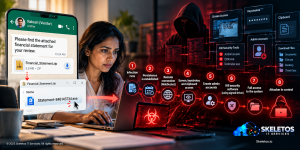
It started with an email that looked like nothing at all.
A member of the sales and marketing team at a midsize insurance backend services company in India clicked a link. The link led to what looked like a normal Microsoft sign-in page. A box appeared asking for permission to connect a productivity app to her account. Read and write access to email. Read and write access to the calendar. The kind of request people see and approve every week without a second thought.
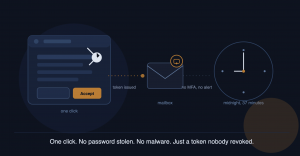
She clicked Accept. Nothing happened. No popup. No warning. No slowdown on her laptop. She went on with her day.
Weeks later, just after midnight, an automated process woke up.
Over the next thirty-seven minutes, a third-party application called WeveAgave accessed her mailbox thirty separate times. It read her calendar. It sent an email from her account to herself, which was then quietly routed into her Deleted Items folder by an inbox rule so she would never see it. It sent another email to a long-standing business contact, carrying a subject line that looked entirely routine.
The company’s antivirus found nothing. There was no malware on her laptop. Her phone was clean. Nobody had broken into anything.
The attacker never touched her password. He never needed to. She had already given him a key three weeks earlier, and neither she nor anyone watching the network knew it.
This is the story of what happened next, what the investigation found, and the very specific reason that changing her password and turning on MFA did not stop the attack.
What Actually Happened
The technical term for this is OAuth consent phishing, or OAuth application token abuse. It is one of the fastest-growing attack methods against Microsoft 365 and Google Workspace accounts globally, and almost nobody outside cybersecurity teams has heard of it.
Here is the mechanism in plain terms. Microsoft 365, like most modern cloud platforms, allows third-party applications to request specific permissions to a user’s account. A scheduling app might ask for calendar access. A note-taking tool might ask for email read access. This is a legitimate, widely used feature that makes modern productivity tools work.
The consent screen that appears looks exactly like a normal Microsoft screen, because it is one. It is hosted on Microsoft’s own domain. There is no fake URL to spot, no spelling error, no obvious red flag. The only thing the user has to evaluate is whether the app requesting access is one they actually want connected to their work email.
In this case, the app was not legitimate. WeveAgave was registered under an external, unknown tenant with no identifiable owner and no real homepage. The moment she clicked Accept, Microsoft issued the application a refresh token. This token is a long-lived digital credential that allows the app to access the mailbox independently of its password, indefinitely, until it is explicitly revoked.
The attacker did not use the token immediately. He waited. Refresh tokens of this kind can remain valid for up to ninety days by default. The consent click and the actual attack were separated by weeks. This is a deliberate pattern. Attackers collect consent grants quietly, across many targets, and activate them later when it suits their purpose.
Why Password Reset and MFA Did Nothing
This is the part of the investigation that should concern every IT team reading this, because it overturns a common assumption.
When the suspicious activity was discovered, the IT team did exactly what most security playbooks recommend. They changed her password. They enabled multi-factor authentication on her account. Both are correct, standard responses to a suspected account compromise.
The attack continued anyway.
The reason is structural, not a failure of effort. A password change does not affect an OAuth refresh token. The token was never tied to her password in the first place. It is a separate credential issued directly to the application by Microsoft at the moment of consent.
MFA applies to interactive logins, the moment a human types a username and enters a code. WeveAgave’s access was non-interactive. It was a machine-to-machine token refresh, the kind of background activity that MFA is not designed to challenge. Every single one of the thirty access events in the investigation logs showed single-factor authentication, meaning MFA was never triggered, because there was no human login event for it to apply to.
The only thing that actually stopped the attack was revoking the specific refresh token issued to WeveAgave and removing the application’s access entirely at the tenant level.
What the Investigation Found, Step by Step
The forensic trail in this incident is worth walking through in detail, because it shows exactly how an IT team should respond when something like this is suspected.
The first sign of trouble came from a routine message trace review. An email had been sent from the affected mailbox to itself at a few minutes past midnight, and it had been automatically filed into Deleted Items by an inbox rule. That is not normal behaviour for a real user. It is, however, exactly what an attacker does to hide evidence from the account owner while still using the mailbox to send messages.
The IP address behind the activity was traced to a Reliance Jio connection in another Indian city, not a foreign location, not the kind of address that immediately screams international threat actor. This matters because it shows attackers exploiting Indian infrastructure against Indian companies, not just the large nation-state campaigns that dominate headlines.
A check of the mailbox’s forwarding rules came back clean. No forwarding rule existed. This ruled out one common compromise pattern but also explained something important: the attacker did not need a forwarding rule, because direct API access through the stolen token meant he could read, send, and delete email without ever touching the mailbox’s configuration.
The breakthrough came from reviewing non-interactive sign-in logs, specifically, a log source many IT teams do not check by default during a routine investigation. This is where WeveAgave was identified, along with the specific OAuth permissions it had been granted: full read and write access to email, full read and write access to calendar, and access to user profile data.
A search of the tenant’s Enterprise Applications registry found that WeveAgave’s service principal was no longer present, meaning the application had already self-removed or been auto-cleaned, a behaviour consistent with deliberately evasive malicious apps designed to avoid leaving an easy audit trail.
The device behind the original consent click was confirmed to be an unmanaged Windows laptop, not enrolled in any mobile device management system. Her phone, checked separately, was confirmed clean. This narrowed the entry point precisely to one consent click on one unmanaged device.
The Fix That Actually Worked
Once the root cause was identified correctly, the remediation was decisive and specific.
Every OAuth refresh token issued to the affected account was revoked directly through the identity platform’s session management. This is different from a password reset. It specifically terminates the application-level access tokens that a password change cannot touch.
User consent to third-party applications was disabled across the entire organisation, not just for the affected account. This means no employee, going forward, can approve a new application’s access request without an administrator reviewing and approving it first. The single click that started this incident can no longer happen unilaterally for anyone in the company.
An admin consent workflow was put in place so that any future application access request is routed to IT for review before it can be granted. This converts a one-click employee decision into a governed approval process, without slowing down legitimate software adoption.
What This Incident Did Not Cause, and What It Might Have
There was no confirmed loss of financial data, customer records, or sensitive business documents in this case. That distinction matters and should be stated honestly.
What was exposed, and what remains a real concern, is the mailbox’s email content during the thirty-seven-minute window, the calendar entries during that period, and most significantly, the contact details and email addresses present in that inbox. An attacker with read access to a business mailbox does not need to steal a database to cause harm. A single contact list, harvested quietly, becomes the seed list for the next phishing campaign, sent from a domain the recipients already trust.
This is the often overlooked secondary harm of an email account compromise. The immediate damage might look contained. The downstream risk, every contact who now might receive a convincing phishing email appearing to come from a known business relationship, is harder to measure and takes longer to surface.
Why This Could Happen to Any Indian Company
This incident did not happen because of a careless employee or a poorly run IT department. It happened because the attack is specifically designed to look unremarkable.
Consent phishing works because the consent screen is real. It comes from Microsoft’s own infrastructure. There is no fake login page to train people to spot. The only judgment call an employee has to make is whether an application’s name sounds trustworthy enough, in the middle of a normal working day, often while multitasking.
Sales and marketing teams are disproportionately exposed to this risk. They install scheduling tools, email tracking add-ons, CRM integrations, and productivity extensions far more frequently than employees in other departments, simply because their workflow depends on connecting tools to their inbox and calendar. Every one of those connection requests is an opportunity for an attacker to disguise a malicious application as a legitimate one.
Most Indian SMEs have no policy at all governing what applications employees are allowed to use to connect to their corporate email. Many do not even know this is a setting that exists and can be controlled at the organisation level.
Steps Every Organisation Should Take Now
These are specific, not generic. Each one closes a gap that this incident exposed directly.
- Disable user consent to third-party applications at the tenant level. This single setting change means no employee can grant any application access to their mailbox without IT approval first. It is available in every Microsoft 365 and Google Workspace tenant and takes a few minutes to configure.
- Enable an admin consent workflow. Rather than blocking new tools outright, route every consent request to IT for review. Legitimate productivity tools still get approved quickly. Malicious ones get caught before a single token is issued.
- Train staff specifically on consent phishing, not just password phishing. Most security awareness training focuses on spotting fake login pages and suspicious links asking for a password. Almost none of it covers OAuth consent screens. The core message employees need to hear: never click Accept on an app permission request without checking with IT first, even if the screen looks completely legitimate, because it usually is legitimate. It is the app behind it that is not.
- Review existing application consents across your organisation today. Most companies have never looked at what third-party applications already have standing access to employee mailboxes. This is a one-time audit that often surfaces forgotten, abandoned, or genuinely malicious access grants that have existed silently for months.
- Enrol devices in mobile device management. The attack in this case originated from an unmanaged device. A conditional access policy requiring a compliant, managed device before accessing company email would have added a meaningful barrier at the point of consent.
- Block legacy authentication protocols. Older protocols like basic SMTP authentication and IMAP can bypass modern MFA entirely. If your organisation has not explicitly disabled these, they remain an open door regardless of how strong your MFA policy looks on paper.
- Treat non-interactive sign-in logs as a standard part of any investigation. Most IT teams default to checking interactive login history first. This incident was only fully understood once non-interactive logs were reviewed. Make this a standard step in every account compromise investigation, not an afterthought.
The Broader Lesson
Every layer of conventional security in this company functioned exactly as designed. Endpoint protection found no malware because there was none to find. The firewall had nothing unusual to block because the entire attack happened inside legitimate cloud infrastructure. Even the password and MFA controls, which most companies treat as their strongest defence, were technically irrelevant to the actual vulnerability.
The gap was never in the tools. It was in a single, narrow decision point that none of those tools were designed to govern: should this specific application be allowed to connect to this mailbox?
That decision, in most companies, including this one before the incident, was left entirely to whichever employee happened to click a link on a given day.
Final Thought
Nobody in this story did anything that the average employee at any company in India does not do regularly. A productivity tool asked for permission. The permission screen looked normal because it was normal. The click took less than a second and felt completely unremarkable.
That is exactly why this attack works, and why it will keep working until organisations close the specific gap it exploits.
Multi-factor authentication is one of the most effective security controls available today, and every organisation should have it. But MFA protects the front door. It says nothing about the side doors that employees, with good intentions and zero malice, open every single day through consent screens that nobody is watching.
The fix here was not more vigilance. It was a governance setting that took fifteen minutes to configure, and that should have existed before this incident happened, not after.
Frequently Asked Questions
- What is OAuth consent phishing, and how is it different from regular phishing?
OAuth consent phishing tricks a user into approving a malicious third-party application’s access request on a real, legitimate Microsoft or Google consent screen, rather than tricking them into typing a password on a fake login page. The user never enters a password to the attacker, which is precisely why this technique evades most traditional phishing awareness training. - Why did changing the password and enabling MFA not stop the attack?
OAuth refresh tokens are issued directly to the application at the moment of consent and are completely independent of the user’s password. MFA only applies to interactive logins where a human enters credentials. The attacker’s access was a non-interactive token refresh, which does not trigger MFA at all. Stopping this specific attack required revoking the application’s token directly, not resetting account credentials. - How can a company prevent this from happening again?
Disable user consent to third-party applications at the organisation level and require IT admin approval for any new application access request. This single configuration change, available in both Microsoft 365 and Google Workspace, removes the ability for any single employee to unilaterally grant a malicious application access to company email. - What data is typically at risk in this type of attack?
Email content, calendar entries, and contact details are accessible within the compromised mailbox during the access window. Even without direct financial loss, exposed contact lists are frequently used to launch convincing follow-up phishing campaigns against business partners who trust communication from that domain. - Is this kind of attack common in India?
Yes. The attack infrastructure in this specific case ran through a domestic Indian mobile network, not an overseas server, showing that this technique is being used by attackers operating within India against Indian businesses, not exclusively as part of large international campaigns.
At Skeletos IT Services, we help Indian companies build the identity and access governance that prevents incidents like this one, including OAuth application controls, conditional access policies, and continuous monitoring that does not depend on someone noticing an anomaly at midnight. If you want to understand whether your organisation has unmonitored third-party application access right now, we can help you find out.