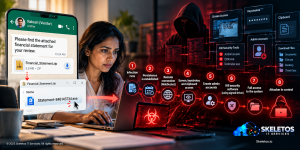
On a normal working morning, the accounts manager at a mid-size NBFC receives a WhatsApp message.
The sender is a contact already in their phone. The message says something like: “Please find the attached financial statement for your review.” There is a ZIP file. The ZIP contains what appears to be a tax document. The file is named Statement-846143734.exe.
She has opened hundreds of documents like this. Financial statements. Tax certificates. Bank confirmations. All received via WhatsApp. All opened without a second thought because this is how Indian business actually works.
She clicks; ‘Statement.exe’ runs.
What happens next takes 8 stages. By the end, an attacker on a WebSocket connection can see her screen, read her keystrokes, access her clipboard, create administrator accounts, kill her security software, and download whatever they want from her machine. Her antivirus cannot stop it. By the time the antivirus would normally detect something unusual, the malware had already used a signed driver to terminate selected security processes. The security tool she was relying on is no longer running.
This is not a hypothetical scenario constructed for this blog. This is the documented attack chain of ‘VulcanRAT207.A’, identified and published by Morphisec on October 12, 2026, reported across Cybersecurity News, GBHackers, and The420.in. An active campaign. Real malware. Real victims.
The lure is financial. The delivery channel is WhatsApp. The timing targets tax and reconciliation season. This campaign was built for the Indian business context. The accounts manager was not careless. She was targeted.
Why WhatsApp Is the Perfect Attack Vector for Indian Business
Before breaking down the technical chain, it is worth spending a moment on the choice of delivery mechanism, because it is not accidental.
India has over 500 million WhatsApp users. For most Indian SMEs, NBFCs, manufacturing companies, and professional services firms, WhatsApp is not a peripheral communication channel. It is the primary one. Tax documents, GST invoices, bank confirmations, financial statements, payment receipts, vendor certificates: all of this flows through WhatsApp daily, between companies, between finance teams and clients, between CAs and their corporate customers.
A financial document arriving via WhatsApp from a known contact does not trigger the same instinctive caution that an email from an unknown sender would. The platform feels personal. The contact is trusted. The document type is expected. In hundreds of similar interactions, nothing bad has happened.
This is exactly the psychological infrastructure that ‘VulcanRAT207.A’ has been built on. The attack starts before the file is even opened, in the moment the recipient decides the attachment is something they are supposed to receive.
Microsoft separately documented a campaign in April 2026 that also abused WhatsApp attachments on Windows to deploy malicious scripts. The WhatsApp delivery vector is now an established, actively exploited pathway.
The 8-Stage Attack Chain That Makes This Different From Standard Malware
Most malware blog posts describe an attack in terms of what the attacker achieves. This one describes how, because the sophistication of ‘VulcanRAT207.A’s technique chain is what determines the defensive architecture required to stop it.
- Stage 1: Delivery and initial execution. The ZIP archive arrives over WhatsApp containing Statement-846143734.exe. This is an NRV2E-compressed wrapper, meaning the real malicious payload is unpacked entirely in memory. Nothing is written to disk in this first stage. This is a deliberate evasion technique: file-based antivirus scanners look for malicious code written to storage. If the malicious code never touches storage, the scanner has nothing to inspect. The malware also checks whether it is running on a genuine user system or in an automated analysis sandbox before proceeding. If it suspects it is being analysed, it stops. This means it was specifically engineered to evade security research tools.
- Stage 2: Privilege escalation. The malware enables SeDebugPrivilege, a Windows privilege that allows a process to debug and inspect other processes. This is the foothold for everything that follows.
- Stage 3: Injection into the Windows Task Scheduler service. Instead of using the commonly detected CreateRemoteThread technique, the malware uses PoolParty Variant 7, an advanced code injection method that exploits the Windows I/O completion system to execute code inside the Task Scheduler service host. This is significant because Task Scheduler runs as LocalSystem, which is SYSTEM-level privilege. The injection does not elevate privilege independently. It borrows the Task Scheduler’s existing SYSTEM token.
- Stage 4: SYSTEM-level scheduled task creation. The malware creates a scheduled task named USOPrivate Kit or USOPrivate. The name is deliberate. USO stands for Update Service Orchestrator, a legitimate Microsoft component involved in Windows Update. The task is designed to look like a routine system maintenance item. Since the scheduled task runs as LocalSystem, every component launched by that task inherits SYSTEM authority. The attacker now has SYSTEM-level persistence that survives reboots without needing to perform any additional privilege escalation.
- Stage 5: C2 communication. Importless shellcode sends an HTTP POST to the command-and-control server at 61.18.208.27:8888. The response is validated against a specific magic header value to confirm it is coming from the legitimate C2 rather than a sinkhole or analysis proxy.
- Stage 6: VulcanRAT deployment. The RAT component is deployed to C:\Program Files\Common Files\vulkan-1.bin. The filename and path mimic the legitimate Vulkan GPU API, a standard graphics library included with many applications. An analyst reviewing the file system would need to know that vulkan-1.bin should be a DLL, not a binary container.
- Stage 7: Signed driver abuse to kill security software. The malware receives driver bytes from the C2, writes them to a temporary file in the Windows drivers directory, and installs it as a system-start file-system-driver service. This driver terminates selected security processes. It uses signed drivers, meaning Windows does not refuse to load it based on signature validation alone. This is the stage that makes ‘VulcanRAT207.A’ particularly dangerous. Most endpoint security tools are hardened against being terminated by user-mode processes. Kernel-mode drivers operating at SYSTEM level can reach them. When the security tool goes down, the attacker has removed the most likely detection mechanism for everything that follows.
- Stage 8: WebSocket RAT connection. A full WebSocket version 13 connection is established to the C2 server. The attacker now has an interactive remote control session with the following capabilities: system reconnaissance, file system access, shell command execution, clipboard read and modification, administrator account creation and password changes, Windows Event Log access, remote desktop control, screen capture, keylogging, and download and execution of additional payloads.
The attacker has not just compromised one machine. They have a pivot point for the entire network that machine is connected to.
What Your Current Defences Miss and Why
This attack chain was specifically designed to defeat the most common enterprise endpoint security configurations. Understanding each evasion is essential for building the right counter-architecture.
- Antivirus misses Stage 1 because the payload never writes to disk in the initial stage. File-based scanning has nothing to scan.
- Behavioural detection misses Stages 2 and 3 because injecting into Task Scheduler via I/O completion ports is a less-documented technique than CreateRemoteThread. Detection rules written for common injection patterns do not catch PoolParty Variant 7 unless specifically updated.
- Process monitoring misses Stage 4 because USOPrivate Kit looks like a legitimate Microsoft update service. An analyst scrolling through scheduled tasks would not immediately flag it without specific knowledge of VulcanRAT indicators.
- Network monitoring catches Stage 5 IF it is watching. The C2 connection to 61.18.208.27:8888 via WebSocket is detectable at the network layer. This is where a network access control and monitoring layer is the control that remains when endpoint security has been killed.
- Endpoint security tools miss Stage 7 specifically because they have already been killed by Stage 7. The BYOVD Bring Your Own Vulnerable Driver) technique that VulcanRAT uses is the attack that terminates the endpoint security process before it can react to the RAT activity in Stage 8.
The Defensive Architecture That Changes This Outcome
The right response to ‘VulcanRAT207.A’ is not awareness training alone. The attack was designed around the trust model of normal Indian business communication. Telling employees not to open WhatsApp attachments is not realistic when their job requires opening WhatsApp attachments.
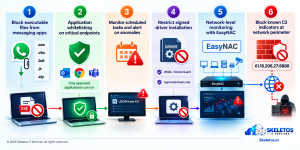
The defensive architecture must work even when an employee does exactly what their job requires.
- Control 1: Block executable content from messaging platforms at the endpoint policy level.
Group Policy and endpoint management platforms, including Microsoft Intune, SCCM, and equivalent MDM solutions, can restrict the execution of executable files downloaded from messaging applications. A policy that prevents .exe, .vbs, .bat, .js, and .zip files containing executables from being launched from the WhatsApp download folder or the default Downloads directory stops Stage 1 before it runs. This is a technical control, not a behavioural one. It does not depend on the employee making the right decision.
- Control 2: Application whitelisting on endpoints handling financial data.
Machines in finance, accounts, HR, and operations- the machines most likely to receive financial lures, should operate under application whitelisting. Only approved, signed executables from defined installation paths can run. Statement.exe from a WhatsApp download folder is not on that list. It cannot execute.
- Control 3: Task Scheduler monitoring with alerting on anomalous task creation.
VulcanRAT creates its persistence via a scheduled task named USOPrivate Kit. This task is created under the SYSTEM account, runs at system start, and launches from C:\Program Files\Common Files. A monitoring rule that alerts on scheduled task creation meeting these criteria, SYSTEM account, non-standard path, boot trigger, created by a process that is not a known Windows system process, would detect Stage 4 before Stage 5.
Windows Event Log ID 4698 records scheduled task creation. Monitor it. Alert on it. A task created in the middle of the day by a non-system process should never be silent.
- Control 4: Restrict signed driver installation to an approved list.
The BYOVD technique in Stage 7 requires installing a driver. Windows has a mechanism to restrict which drivers are allowed to run: WDAC, Windows Defender Application Control, and its predecessor Device Guard. An organisation that has deployed WDAC with a restrictive driver policy prevents the attacker from loading the custom driver that kills security software. This is the control that stops Stage 7 before the security tools are terminated.
- Control 5: Network-level monitoring as the independent detection layer.
The specific control that makes VulcanRAT’s Stage 7 irrelevant from a detection perspective is network monitoring that operates independently of the endpoint. When the malware kills the antivirus process, it kills software running on the compromised machine. It cannot kill a network access control system monitoring traffic from outside the machine.
EasyNAC monitors every device on the network and every connection those devices make. The WebSocket connection from an infected machine to 61.18.208.27:8888 is visible at the network layer regardless of what has happened to the endpoint security tool. An unknown external IP, an unusual port, WebSocket traffic from a finance workstation that does not normally initiate external WebSocket connections: all of these are detectable anomalies at the network level.
When the endpoint tool is dead, the network layer is the last line of active detection. It must be independent. It must be monitoring in real time. And when it detects the C2 beacon, it must be able to isolate the infected device from the rest of the network before lateral movement begins.
- Control 6: Block the known C2 indicator at the network perimeter immediately.
The C2 server IP is publicly documented: 61.18.208.27:8888. Block this IP and port at the firewall right now. Add it to your threat intelligence feed. This specific indicator is hot today. In a week, the attacker may rotate infrastructure. But blocking known active C2 infrastructure as soon as it is published is a basic operational response that every IT team should execute within hours of this blog being published.
The Incident Response Checklist for a Suspected VulcanRAT Infection
If an employee in your organisation has opened a WhatsApp attachment that contained an executable, or if your security monitoring has flagged any of the VulcanRAT indicators, these are the immediate actions.
- Isolate the machine immediately. Disconnect from the network before any further investigation. An attacker with SYSTEM-level access and an active WebSocket connection can watch you investigate, copy your investigation notes, and escalate their attack in response. Take the machine offline before you open it.
- Preserve the forensic state. Before any remediation, preserve a memory image if possible. VulcanRAT executes in memory in its early stages. Memory forensics may recover indicators that disk-based investigation misses.
- Check for USOPrivate Kit and USOPrivate in the Task Scheduler. This is the persistence mechanism. If these tasks exist on any machine, the machine has been compromised. Do not simply delete the tasks. Wipe and rebuild.
- Check for vulkan-1.bin in C:\Program Files\Common Files. This is the VulcanRAT container. Its presence confirms the deployment stage was reached.
- Review network logs for connections to 61.18.208.27:8888. If any machine in your environment has connected to this IP on this port, assume that machine is compromised.
- Check for newly created administrator accounts. VulcanRAT can create administrator accounts for persistence. Review all local and domain accounts created in the past 30 days from affected machines.
- Notify CERT-In within 6 hours. A confirmed malware infection with SYSTEM-level access and a remote connection qualifies as a significant cybersecurity incident under CERT-In’s reporting requirements.
What to Communicate to Your Finance and Operations Teams
Technical controls protect the organisation at the system level. Communication protects it at the human level. Both are required. The message for finance teams is specific and actionable, not generic.
Executable files should never be received via WhatsApp for business purposes. If someone sends you a financial document via WhatsApp and it is a ZIP file containing an .exe file, do not open it. Contact the sender through a separate channel, a direct phone call, not a WhatsApp reply, to verify they sent it.
Legitimate financial documents are PDFs or Excel files. A .exe file claiming to be a tax document or financial statement is not legitimate. If you receive and open an attachment and your machine behaves unusually, immediately contact IT. Do not try to investigate yourself. Do not restart the machine.
This message should go out by email today. Not a long policy document. Two paragraphs. Specific instructions. Concrete examples.
Final Thought
‘VulcanRAT207.A’ was not built by a careless attacker. It was built by someone who studied how Indian businesses communicate, identified the trust model that exists around financial document sharing on WhatsApp, and constructed an 8-stage attack chain that specifically defeats the security tools most organisations rely on.
The accounts manager who opened Statement.exe was not reckless. She was the target of a specifically engineered attack. The responsibility for stopping it cannot sit entirely with her decision to open a file that she was expected, by her job description and her organisation’s operating culture, to open.
The controls that stop VulcanRAT are technical. Application whitelisting. Task Scheduler monitoring. Driver restriction. Network-level detection independent of the endpoint. A response process that isolates first and investigates second.
Those controls need to be in place before the next Statement.exe arrives in someone’s WhatsApp inbox.
It will arrive. The only question is what the architecture does with it.
At Skeletos IT Services, we help Indian companies build the network visibility layer that detects command-and-control connections even when endpoint security tools have been compromised, and the endpoint governance architecture that prevents malware from executing in the first place. EasyNAC provides real-time network monitoring across every connected device, flagging unusual outbound connections and isolating infected devices before lateral movement begins. If you want to understand whether your current architecture would detect and contain a VulcanRAT-style infection, we can help you find out.
Note: This blog is based on Morphisec’s threat research published October 12, 2026, as reported by Cybersecurity News, GBHackers, The420.in, Cyberpress, and Business Upturn. Indicators of compromise, including the SHA-256 hash, C2 IP, scheduled task names, and file paths, are drawn directly from the Morphisec report. Block the C2 IP 61.18.208.27 and validate all indicators against the original Morphisec research before use in incident response. This blog is for awareness and educational purposes.